

Turn “What’s my car worth?” into your next appraisal appointment.
Customers get a market-based trade-in estimate on your branded page in about two minutes. Your team receives their vehicle details, reported condition, contact information, and estimate — ready for follow-up.
See it on your own website first — book a short demo and walk through the branded page, the widget, the VIN market report, and the CRM lead format.
Where your customers find it
One tool, three places your trade-in conversations already start.
On your website
Add the estimate tool to your trade-in page as a tab, a button, or a full page. Shoppers who were only browsing leave their vehicle details instead of bouncing.
In the service lounge
A printed QR code on the service desk or in the lounge turns waiting customers into trade-in conversations. Each code is tagged so you can see how many appointments it produced.
From a salesperson's phone
Your team texts or emails their branded link to any prospect. The customer completes it in about two minutes and the lead comes back with the full condition report.
What the customer does, what you receive
The estimate is the starting point of the conversation, not the end of it. Every number is clearly labeled an estimate, with the final appraisal subject to a physical inspection — so your team sets the real figure in person.
The customer sees
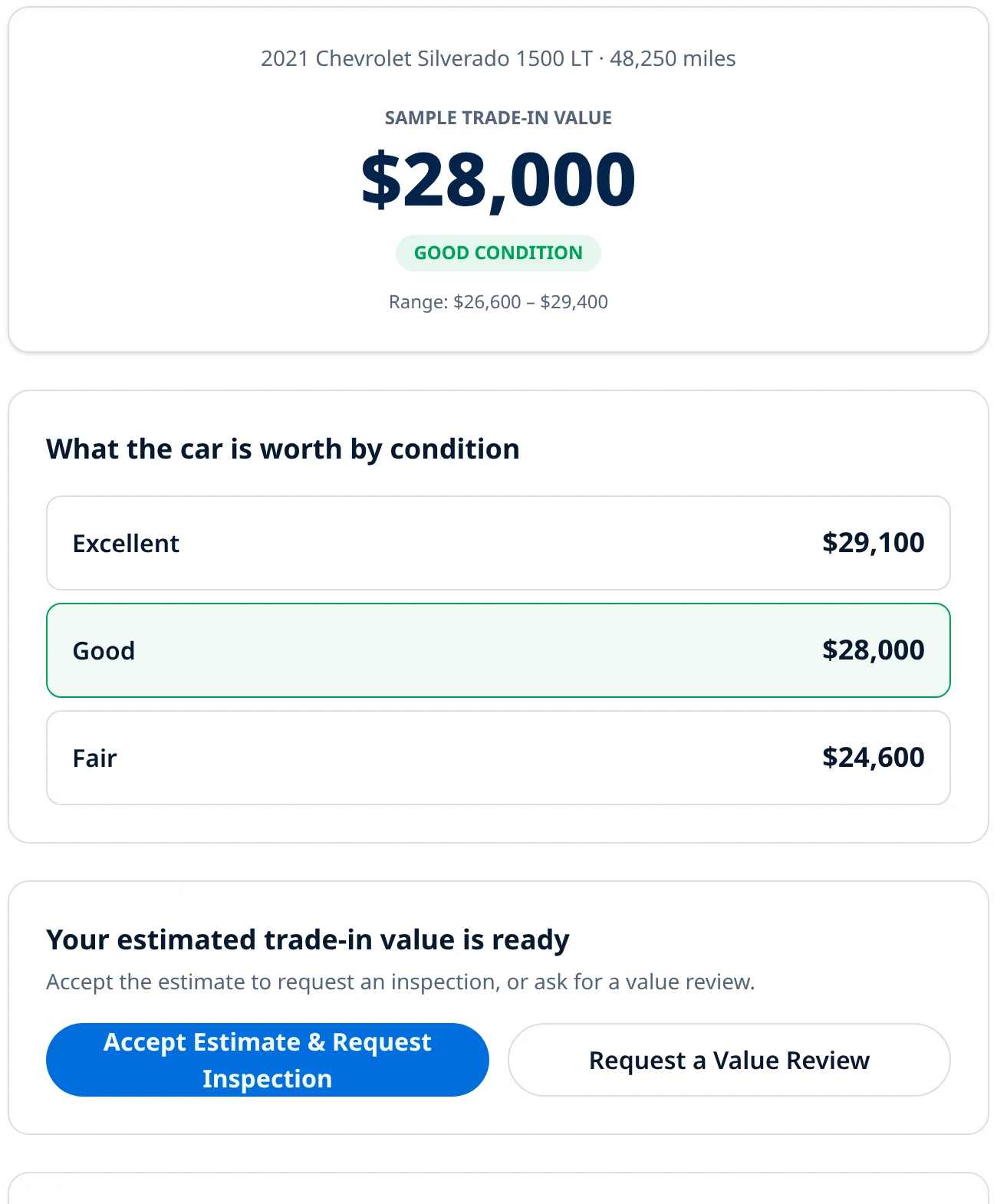
- VIN, year, make, model, trim, and current mileage
- Accident history, title status, and remaining loan or lease payoff
- Self-reported condition: tires, interior, mechanical, and cosmetic
- Name, phone, email, and the estimate range they were shown
Your desk sees
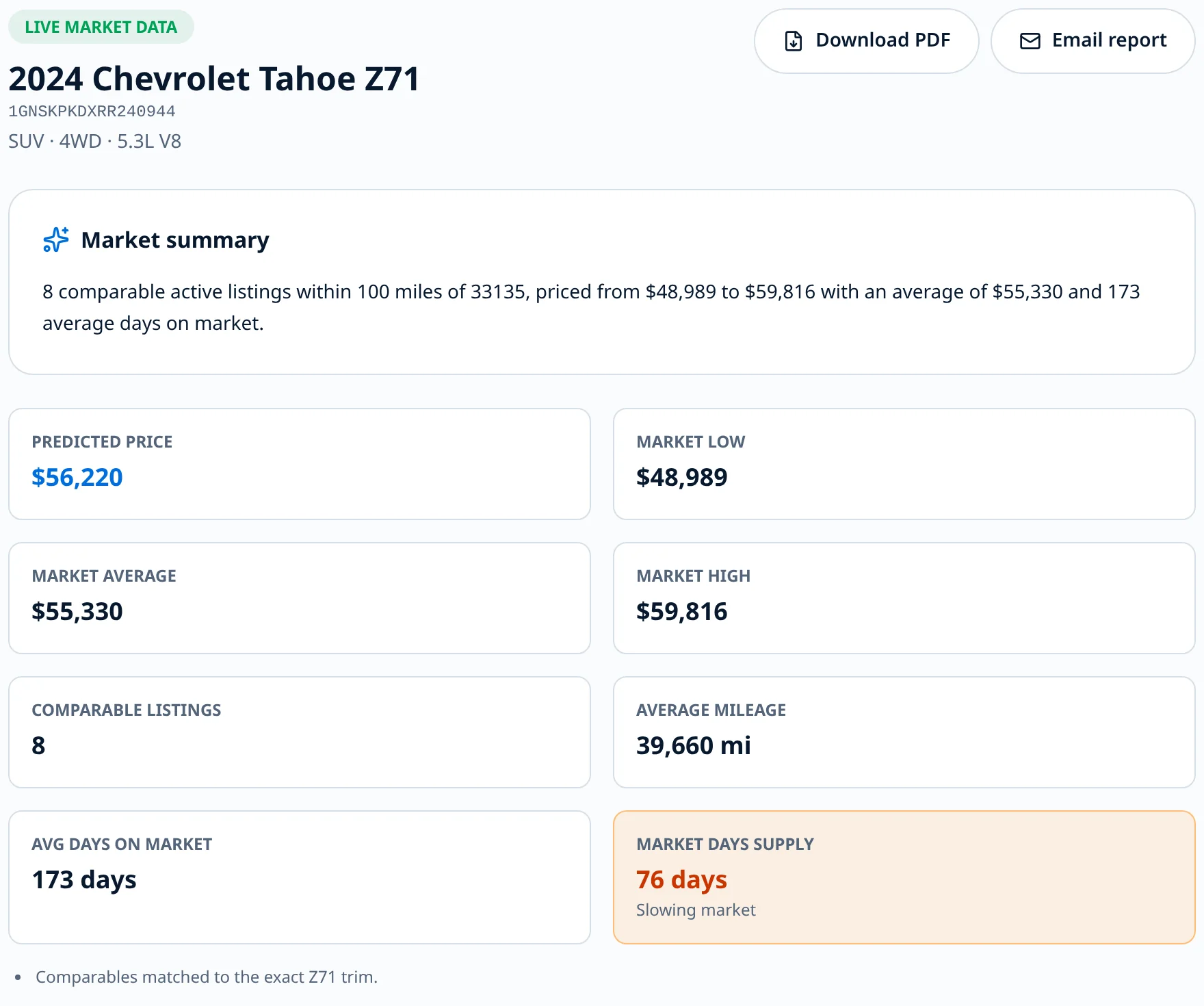
- The same estimate the customer saw, so nobody starts from a different number
- Live comparable listings, days on market, and market days supply for that VIN
- Factory build data — installed options and window sticker — to justify the number
- A suggested trade-in offer after your reconditioning costs and profit objective
Embed it anywhere
Drop one line of code on your site and the estimate form appears in any page or tab, sized automatically.
Your brand, your page
A white-label estimate page with your logo, colors, phone number, and disclaimer — no platform branding.
Leads straight to your CRM
Every submission is emailed to the addresses you choose, including an ADF/XML lead your CRM can import.
VIN Market Report
Look up any VIN and see predicted price, comparable local listings, days on market, and market days supply.
Live market values
Estimates are built from current market data, then adjusted for mileage, history, and condition.
Built for appraisals
The full condition questionnaire your appraisers already use — accidents, title, tires, interior, and more.
Works with your website and your CRM
Your website
The embed is a single snippet of code, so it works on any site that lets you paste HTML into a page or widget — including dealer website platforms and standard content management systems. If your provider doesn’t allow custom code, use your hosted AskViny page and link or button to it instead; nothing has to be installed.
Your CRM
Leads are delivered by email to any addresses you choose, and each one includes an ADF/XML attachment — the standard automotive lead format most dealer CRMs import from an email inbox. If your CRM accepts ADF leads by email, it accepts these. We recommend sending a test lead to your CRM inbox during setup.
Pricing
Per rooftop, month-to-month. Book a demo and we’ll walk through the plan that fits your store.
How setup works
- 1Create your account and add your dealership name, logo, colors, and contact details.
- 2Add the CRM email addresses that should receive every lead.
- 3Copy your embed snippet onto your website, or share your branded estimate page link.
- 4Print your service lounge QR code and give your team their share link.
- 5Watch leads arrive in your dashboard and your CRM at the same time.
See it on your own website
Walk through the live demo to see the branded page, the widget, the VIN market report, and the CRM lead format — or create your account and try it with your own inventory.